Stimulsoft Stimulsoft
Video Samples Support
Reports and Dashboards

  • Introduction
    • Activation
    • Technical Support
    • Web Links and Online Resources
  • Features: Stimulsoft Reports
    • Designers
      • Features
      • Components
      • Report Wizards
      • Console Commands
      • Skill Level
    • Viewers
      • Features
      • Exports
    • Products
      • System Requirements
      • Reports
      • Product Comparison
      • Database Packs
      • Reporting Features
      • Tools
      • User Interface
      • Localizations
      • Internal Formats
      • Stimulsoft Cloud
  • Getting Started
    • Installation and first run
    • Data connection
    • Creating Relation
    • Data transformation
    • Creating a dashboard
    • Dashboard with Table
    • Dashboard with Chart
    • Dashboard with Gauge
    • Dashboard with Pivot Table
    • Dashboard with Indicator
    • Dashboard with Progress
    • Dashboard with Region Map
    • Dashboard with Custom Region Map
    • Dashboard with Online Map
    • Dashboard with Images
    • Dashboard with Text
    • Dashboards with Shapes
    • Dashboards with List Box
    • Dashboards with Combo Box
    • Dashboards with Tree View
    • Dashboards with Tree View Box
    • Dashboards with Date Picker
    • Dashboard Design
    • Grouping elements on Dashboard
    • Dashboard with Top N
    • Sorting on a dashboard
    • Creating report using Wizards
      • Standard Report
      • Master-Detail Report
      • Chart
      • Cross-Tab
      • Label Report
    • Simple List Report
    • Master-Detail Report
    • Report with Groups
    • Report with Columns on Page
    • Report with Columns in Data Band
    • Report with Chart on Page
    • Report with Chart in Data Band
    • Report with Cross-Tab on Page
    • Cross-Tab Report in Data Band
    • Hierarchical Report
    • Report with Sub-Report
    • Side-by-Side Report
    • Report with Sub-Reports in Data Band
    • Master-Detail Report and Sub-Reports
    • Report with Empty Band
    • Drill-Down Report Using Page in Report
    • Drill-Down Report Using External Report
    • Report without Bands
    • Report with Multiple Pages in Template
    • Report with Segmented Pages
    • Report with Primitives on Page
    • Report with Primitives in Band
    • Report with Cross-Primitives
    • Drill-Down Report
    • Report with Dynamic Data Sorting in Preview
    • Report With Dynamic Collapsing in Preview
    • Report with Table Component
    • Master-Detail Report with Table
    • Anchors in Report
    • Invoice Report
    • Creating Reports in Designer
      • Overview
        • Wizard Standard Report
        • Wizard Master-Detail Report
        • Wizard Label Report
        • Wizard Chart
        • Wizard Cross-Tab
    • Invoice Report With Parameters
  • Report Internals
    • Expressions
      • Text Expressions
      • Calculating Values in Expressions
      • Multi-line Expressions
      • Using Dictionary Variables
      • Using Data Fields
      • Using Component Properties
      • Using Functions in Expressions
      • Conditional Expressions
      • Using Aliases in Expressions
    • Appearance
      • Brush
      • Font
      • Borders
      • Horizontal Alignment
      • Vertical Alignment
      • Styles
        • Style Designer
        • Component Style
        • Chart Style
        • Gauge Style
        • Map Style
        • Cross-Tab Style
        • Table Style
        • Cards Style
        • Indicator Style
        • Progress Style
        • Report Control Style
        • Watermark Style
        • Collections
        • Conditions
    • Conditional Formatting
      • Value Condition
      • Operators
      • Expression Condition
      • Multi Part Conditions
      • Defining Formatting
      • Conditional Formatting and Text Components
      • Conditional Formatting and Cross-Tables
      • Visual Styles Menu
        • Font Name
        • Font Size
        • Font Bold
        • Font Italic
        • Font Underlined
        • Text Color
        • Back Color
        • Borders
        • Enabling Component
        • Assigning Expression
      • Data Bar Condition
      • Color Scale Condition
      • Icon Set Condition
    • Output Text Parameters
      • Text Editor
      • Multiline Text
      • Trimming in the End of Text Line
      • Prevent Showing Incompletely Visible Lines
      • Lines of Underlining
      • Maximal Number of Lines
      • Text Rotation
      • Processing Duplicates
      • Ignoring Null Values
      • ReportTo Property
      • Shrink Font To Fit Property
      • Shrink Font to Fit Minimum Size Property
      • Output Text Only without Taking Expressions into Consideration
      • Expression Processing in the End of Report Rendering
      • Zip code
      • Text Quality
    • Text Formatting
      • Standard Formatting
      • Numerical Formatting
      • Currency Formatting
      • Date Formatting
      • Time Formatting
      • Percentage Data Formatting
      • Boolean Values Formatting
      • Custom Formatting
      • Formatting in Text
    • HTML Tags
      • HTML <font> Tag
        • Color Attribute
        • Face Attribute
        • Size Attribute
      • HTML Tags to Change Font Style
        • HTML <b> Tag
        • HTML <i> Tag
        • HTML <em> Tag
        • HTML <u> Tag
        • HTML <s> Tag
        • HTML <sup> Tag
        • HTML <sub> Tag
        • HTML <strong> Tag
        • HTML <p> Tag
        • HTML <br> Tag
        • HTML <ol> Tag
        • HTML <ul> Tag
      • HTML <background-color> Tag
      • HTML <text-align> Tag
      • HTML <letter-spacing> Tag
      • HTML <word-spacing> Tag
      • HTML <line-height> Tag
      • Special Characters
    • Rich Text
      • Rich Text Editor
      • Expressions in Rich Text
      • Loading Rich Text From Data Field
    • Autosize
      • Automatically Resizing Text Component
      • Automatically Resizing Panels
      • Automatically Resizing Bands
      • Binding Bottom Border of Component
      • Automatically Shifting Components
    • Barcodes
      • Barcode Editor
      • Barcode Size
      • Linear Barcodes
        • EAN/UPC Barcodes
          • What is EAN.UCC System?
          • UPC-A
          • UPC-E
          • EAN-13
          • EAN-8
          • Add-On Symbols
          • EAN-128
          • ITF-14
          • JAN-13
          • JAN-8
          • ISBN-10
          • ISBN-13
        • Other Barcodes
          • Pharmacode
          • Plessey
          • Msi
          • 2of5
          • FIM
          • Codabar
          • Postnet
          • Australia Post 4-state
          • Royal TPG Post KIX 4-State
          • Royal Mail 4-state
          • Code11
          • Code39
          • Code93
          • Code128
        • Barcode Comparison Table
      • 2D Barcodes
        • PDF417
        • Datamatrix
        • QR Code
        • Support for GS1 standard
        • PDF417 Macro
    • Report
      • Report Structure
      • Report Rendering
    • Pages
      • Print On Previous Page Property
      • Margins
    • Bands
      • Band Types
        • Standard Bands
        • Cross-bands
      • Rendering Order of Bands
    • Creating Lists
      • Data Band
      • Data Source of Data Band
      • List Output
      • List with Header
      • List with Footer
      • KeepHeaderTogether Property
      • KeepFooterTogether Property
      • Enumeration in Lists
      • Selecting Rows One After Another
      • Events and Data Band
      • Data Sorting
      • Data Filtering
      • Lists One After Another
      • PrintOn Property
      • PrintOnEvenOddPages Property
      • PrintOnAllPages Property
      • PrintAtBottom Property
      • Drag and Drop From Dictionary
      • Check Box
    • Creating Master-Detail Lists
      • MasterComponent Property
      • DataRelation Property
        • Relation
      • Multilevel Nesting
      • KeepDetails Property
      • Rows Numbering in Master-Detail Reports
      • Through Lines Numbering in Master-Detail Reports
      • Headers, Footers and Master-Detail Reports
      • PrintifDetailEmpty Property
    • Groups
      • Grouping Conditions
      • Group Header band
      • Group Footer band
      • Data Sorting in Group
      • GroupFooter
      • KeepGroupTogether Property
      • KeepGroupHeaderTogether Property
      • KeepGroupFooterTogether Property
      • Events and Group Header band
      • Group Without Group Header
      • Nested Groups
      • Groups Without Group Footer
      • LineThrough System Variable
      • Numbering Rows in Group
      • GroupLine System Variable
      • Combining Groups and Master-Detail Reports
    • Page Bands
      • Page Header Band
      • Page Footer Band
      • PrintOnEvenOddPages Property
    • Report Bands
      • Report Title band
      • Report Summary band
      • ReportTitleBand Property
      • KeepReportSummaryTogether Property
      • Print At Bottom Property
      • Print If Empty Property
    • Columns
      • Columns on Page
      • Columns on Data Band
        • AcrossThenDown Mode
        • DownThenAcross Mode
        • Minimal Number of Rows in Column
        • Column Header Band
          • PrintIfEmpty Property
        • Column Footer Band
          • PrintIfEmpty Property
        • Header and Footer Combinations
          • AcrossThenDown Column Mode
          • DownThenAcross Column Mode
    • Page and Column Break
      • Page Break
      • Column Break
      • Break if Less Than Property
      • Skip First Property
    • Pagination
      • Page Number
      • Total Page Count
      • Page NofM
      • ResetPageNumber Property
      • Sequentially Numbered Pages
    • Breaking Component
      • Breaking Bands
      • Breaking Text
      • Breaking Panels
      • Breaking RichText
      • Breaking Images
      • Auto-break
      • Breaking and Page Bands
    • Hierarchical Band
      • Data Output
      • KeyDataColumn Property
      • MasterKeyDataColumn Property
      • ParentValue Property
      • Indent Property
    • Child Band
      • Multi Line Header
      • Child Band and Data
      • KeepChildTogether Property
    • Empty Band
      • Empty Band Modes
    • Watermarks
      • Watermark Property
      • Overlay Band
        • Vertical Alignment Property
      • Direct Allocation on Page
    • Panels
      • Placing Bands on Panel
      • Placing Panels
        • Placing Panels on Page
        • Placing Panels on Band
        • Placing Panels on Panel
      • Side-by-Side Reports
      • Multiple Tables on One Page
      • Cloning
    • Cross-Tab
      • Data Source Property
      • Cross Table Items
        • Columns
        • Rows
        • Summary Cells
      • Cross-Tab Editor
        • Cross-Tab Tab
        • Styles Tab
      • Data Summary Types
      • Sort Direction
      • Conditions
      • Showing Totals
      • Processing Values for Summary
      • Word Wrap
    • Charts
      • Chart
        • Common
        • Legend
        • Title
        • Constant Lines
        • Strips
        • Table
      • Series
        • Common
        • Conditions
        • Filters
        • Marker
        • Line Marker
        • Interaction
        • Trend Line
        • Top N
        • Labels
      • Area
        • Common
        • X Axis
        • Y Axis
        • X Top Axis
        • Y Right Axis
        • Grid Lines Horizontal
        • Grid Lines Vertical
        • Grid Lines Right Horizontal
        • Interlacing Horizontal
        • Interlacing Vertical
      • Labels
        • Common
        • Conditions
      • Style
        • Creating Custom Style
      • Charts Properties
        • Area
          • Doughnut
            • Series Labels
          • Pie
            • Series Labels
            • CutPieList Property
        • Legend
          • Title Property
          • HorizontalAlignment Property
          • VerticalAlignment Property
          • Horizontal Spacing and Vertical Spacing Properties
          • Marker
            • Direction Property
            • Columns Property
            • Marker Alignment Property
            • MarkerVisible Property
      • Charts Editor
        • Tab Chart
        • Tab Series
        • Tab Area
        • Tab Labels
        • Tab Styles
        • Wizard
      • Axes Area
        • Axes
          • ArrowStyle Property
          • Labels
            • Angle Property
            • Format Property
            • Placement Property
            • TextAlignment Property
          • Range Property
          • Visible Property
          • StartFromZero Property
          • Ticks
            • Minor
            • Step Property
          • Title Property
            • Alignment Property
        • ReverseVertical Property
        • ReverseHorizontal Property
        • ColorEach Property
      • Series
        • Data Connection
          • Data Column
          • Expressions
          • List of Values Property
        • AutoSeries
        • Filters
        • Conditions
        • Series Editor
        • Axis Y
        • Top N
      • Series Labels
        • Series Labels Appearance
          • Brush Property
          • Font Property
          • LabelColor Property
          • UseSeriesColor Property
          • Angle Property
          • DrawBorder Property
          • BorderColor Property
          • Antialiasing Property
        • Format Property
        • ValueType Property
        • ValueType Separator
        • PreventIntersection Property
        • ShowOnZeroValues Property
        • Step Property
        • TextBefore and TextAfter Properties
        • Visible Property
        • Marker
          • MarkerVisible Property
          • MarkerSize Property
          • MarkerAlignment Property
      • Style
        • AllowApplyStyle Property
    • Table
      • Columns
      • Rows
      • DataSource Property
      • MasterComponent Property
      • Relation Property
      • Tables and Bands in Master-Detail Lists
      • Tables and Grouping
      • Table Header
      • Table Footer
      • Cells Width Autochange
        • AutoWidth Property
        • AutoWidthType Property
      • FixedWidth Property
      • CellType Property
    • Primitives
      • Cross-Primitives
    • Sub-Reports
      • Editor
      • Report sample with parameters
      • Sub-Reports on Page
      • Sub-Reports on Data Band
      • Master-Detail Reports and Sub-Reports
      • Side-by-Side Reports and Sub-Reports
    • Functions
      • Totals
        • Totals Associated with Bands
        • Totals not Related to Bands
    • Interaction
      • Bookmarks
        • Tree of Bookmarks
        • Bookmarking Using Code
        • Creating Bookmarks Using Expression
        • Bookmark Nesting
      • Hyperlinks
        • Hyperlink to Another Component in Report Using Interaction.Bookmark
        • Hyperlink to Another Component in Report Using Interaction.Tag
        • Hyperlink to External Documents
      • Drill-Down Reports
        • Drill-Down Report Using Report Pages
        • Drill-Down Reports Using External Report
        • Interactive Selection
        • Drill-Down Parameters
      • Dynamic Sorting
      • Dynamic Collapsing
      • Reports with Contents
      • Editing
    • Table of Contents
      • Anchros
      • TOC Component
    • Signature
      • Electronic Signature
      • PDF Digital Signature
      • PDF Element
    • Components
      • Image
      • Sparkline
    • Gauge
      • Gauge editor
    • Maps
      • Map Editor
      • Map Types
      • Map Keys
      • Data for Maps
    • Graphic Information Output
      • Loading Images
      • Image Stretching
      • Resources of Images
  • Dashboards
    • Appearance
    • Data
    • Groups
    • Table
    • Cards
    • Chart
    • Gauge
    • Pivot
    • Indicator
    • Progress
    • Maps
      • Region Map
      • Online Map
    • Filtering data
      • Relationship of Elements
      • Data Transformation
      • Filters
      • Top N
      • List Box
      • Combo Box
      • Tree View
      • Tree View Box
      • Date Picker
      • Number Box
      • Variables
    • Web content
    • Image
    • Panel
    • Text
    • Shape
    • Button
    • Interaction
    • Sorting
    • Conditions
  • Report Designer
    • File menu
      • Info
      • New
      • Open
      • Save and Save As
      • Preview
      • Schedule
      • Share
      • Publish
      • Help
      • Get Started
      • Close
      • Account
      • Options
      • About
      • Dialog Report Setup
    • Tab Home
    • Tab Insert
    • Tab Page
    • Tab Layout
    • Panels
    • Report Template
      • Calculation mode
      • Globalization Editor
      • Report Culture
      • Refresh Time
      • Preview settings
      • Retrieve Only Used Data
    • Hotkeys
  • Data
    • Data Dictionary
      • Control Panel
        • Actions Menu
        • New Item Menu
      • Data Sources
        • Queries
          • Parameters
        • Creating Data Source
        • Creating and Editing Data Columns
        • Calculated Data Column
        • Data From Other Data Source
        • Data From Cross-Tab
        • Custom Data Sources
      • Relation
        • Filtering
        • Sorting
        • Showing Information
        • Master-Detail Report
        • Creating Relation
          • Limitations in Creating Relations
      • Variables
        • Panel Request From User
          • Items Dialog
          • Dependent Variables
        • New Variable
        • Nullable Value
        • List
        • Range
        • Three Modes of Variable Functioning
        • Validation
      • Connection
      • Panel Setup
      • System Variables
      • Business Object
      • Resources
      • User Functions
    • Data Transformation
      • Structure
      • Join tables
      • Grouping Data
      • Using functions
      • Filtering Data
      • Skip and Limit Rows
      • Replace Values
      • Running Total
      • Running Average
      • Show Percentage
      • Sorting Data
  • Right To Left
    • Text Component
    • Text In Cells Component
    • Cross Table Component
    • Chart Component
    • Columns on Page
    • Columns in Data Band
  • Viewer
    • Reports
      • Dot-Matrix
      • Special Viewing Options in Web
    • Dashboards
  • Exports
    • Available File Formats
    • Common Export Settings
      • Image Quality
      • Image Resolution
      • Image Comparer
      • Convert Digits to Arabic
      • Arabic Digits Type
      • Divide Segment Pages
      • Remove Empty Space at Bottom
      • Use One Page Header and Footer
    • Formats with Fixed Page Layout
      • PDF
        • Embedded Fonts
          • Font Styles
        • Digital Signature
          • Keys
          • Public Key Certificate
          • Choosing Certificate
          • Placing Digital Signature Identifier
        • Encryption
          • Passwords and Access Permission
          • Key Length
        • Compatibility of Different Versions
      • XPS
      • Microsoft Power Point
    • Web Documents
      • HTML
        • Export Modes
        • Export Images in HTML Format
        • Compatibility of Different Versions
        • Exporting Text Components
      • HTML5
      • MHT
    • Text Formats
      • TXT
        • Border Types
        • Column Width
        • New Export Mode
      • RTF
        • Export Modes
          • Table Mode
        • Issues
        • Compatibility of Different Versions
      • Word
        • Headers and Footers
          • Page Numbering
      • ODT
    • Spreadsheets
      • Excel
        • Excel Sheets
        • Compatibility of Different Versions
      • Excel XML
      • Excel 2007/2010
        • Sheets in Excel
      • ODS
      • Excel value
    • Data
      • CSV
        • Controlling Exports
      • DBF
        • Controlling Exports
      • XML
        • Controlling Exports
      • DIF
      • SYLK
    • Images
      • BMP
      • GIF
      • PNG
      • TIFF
      • JPEG
      • PCX
      • EMF
      • SVG
      • Compressed SVG
      • Dither
    • How to Create Report for Export?
    • Export Dashboard
Features: Stimulsoft Reports › Viewers

Viewers

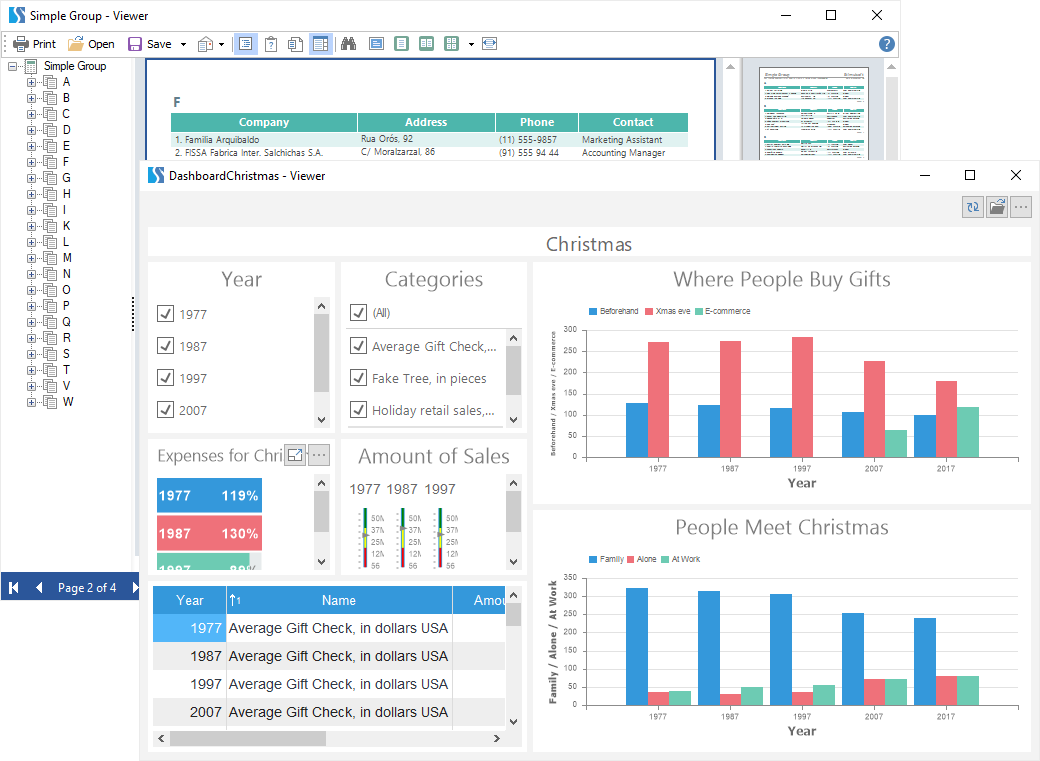
A report viewer is a tool that is used to view, print, export reports and dashboards. In this section, you can find:

  • With the viewer functionality;

  • With the list of export formats in the viewer.