

Direct Allocation on Page
One way to place a watermark is to position it directly on the page. This means placing any component that will serve as the watermark directly on the report template page. The image below shows a “watermark” created by directly placing a text component on the report template page.
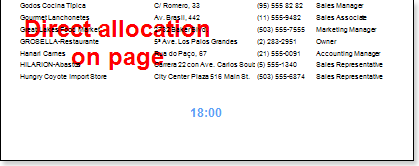
Direct placement on a page allows text to be displayed in the background anywhere in the working area. When TextBox component is placed directly on a page, the page of the report template becomes its “owner”.
To prevent a text component placed on a page from changing its “owner”, i.e., from becoming an element of one of the bands placed on the page, set the Linked property.
The Linked property can have two values: true and false.
If the property is set to false, the relationship with the “owner” is not fixed. In this case, the “owner” is the report template element on which the TextBox component is currently located.
If the property is set to true, the relationship with the “owner” is fixed. The TextBox component can be moved, but it remains associated with the element to which it was linked.