

Work with Bookmarks
The support of report bookmarks is implemented in the Blazor Viewer component. When displaying a report, the panel with bookmarks will be displayed to the left of the page. When selecting a bookmark for a report, the viewer will automatically transit to the page you need, and the report element with a bookmark will be highlighted.
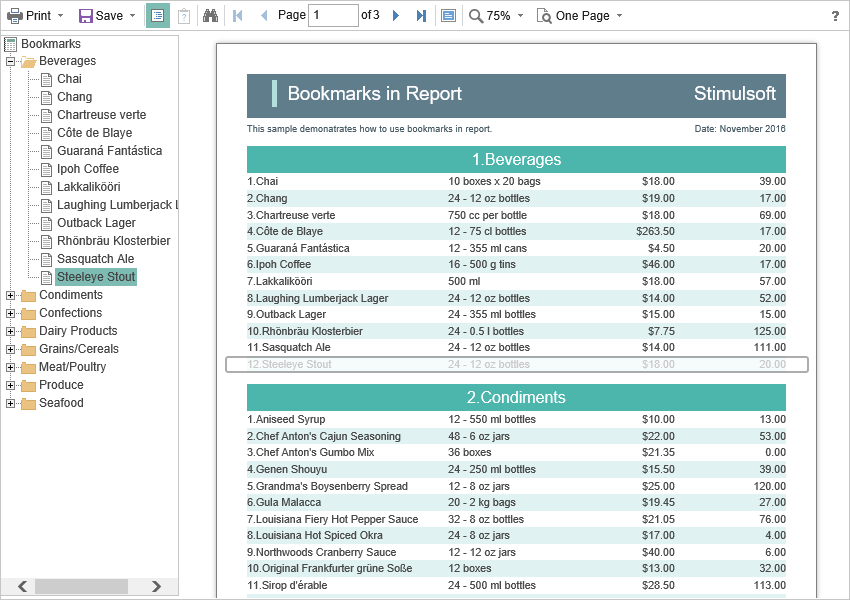
By default, the width of the bookmark panel is 180 pixels; the Blazor Viewer component allows you to change this value. The BookmarksTreeWidth is intended for this. Its value is specified in pixels.
Index.razor
@using Stimulsoft.Report
@using Stimulsoft.Report.Blazor
@using Stimulsoft.Report.Web

<StiBlazorViewer Options="@Options" />

@code
{
    //Options object
    private StiBlazorViewerOptions Options;

    protected override void OnInitialized()
    {
        base.OnInitialized();

        //Init options object
        Options = new StiBlazorViewerOptions();
        Options.Appearance.BookmarksTreeWidth = 200;
    }
}
If the work with report bookmarks is not requested, you can completely disable this feature. The ShowBookmarksButton property is used for this, and it should be set to false.
Index.razor
@using Stimulsoft.Report
@using Stimulsoft.Report.Blazor
@using Stimulsoft.Report.Web

<StiBlazorViewer Options="@Options" />

@code
{
    //Options object
    private StiBlazorViewerOptions Options;

    protected override void OnInitialized()
    {
        base.OnInitialized();

        //Init options object
        Options = new StiBlazorViewerOptions();
        Options.Toolbar.ShowBookmarksButton = false;
    }
}
Information
In this case, report bookmarks won’t be shown, even if they are present in a displayed report. This feature does not exert influence over printing and exporting a report.
When printing a report with bookmarks, the tree of bookmarks will be hidden. If apart from a report you need to print and bookmarks too, you should set the BookmarksPrint property to true.
Index.razor
@using Stimulsoft.Report
@using Stimulsoft.Report.Blazor
@using Stimulsoft.Report.Web

<StiBlazorViewer Options="@options" />

@code
{
    //Options object
    private StiBlazorViewerOptions options;

    protected override void OnInitialized()
    {
        base.OnInitialized();

        Stimulsoft.Base.StiFontCollection.AddFontFile("Fonts/Microsoft Sans Serif.ttf", "Segoe UI");

        //Init options object
        options = new StiBlazorViewerOptions();
        options.Appearance.BookmarksPrint = true;
    }
}