

Localization
The Flash Designer component supports the complete localization of its interface. To localize the report designer interface, use the special Localization property. As a value of this property you should specify the path to the localization XML file (relative or absolute).
Index.cshtml
...
@Html.Stimulsoft().StiMvcDesignerFx("MvcDesignerFx1",
    new StiMvcDesignerFxOptions() {
        Localization = "~/Content/Localization/en.xml"
})
...
If you need to control loading the localization, you need to define a special action of the GetLocalization designer, which will be used to transfer the XML localization file to the client-side. As a parameter for the response, you can specify the path to the XML localization file or an XML object that contains the loaded information from the localization file.
Index.cshtml
...
@Html.Stimulsoft().StiMvcDesignerFx("MvcDesignerFx1",
    new StiMvcDesignerFxOptions() {
        Actions =
        {
            GetLocalization = "GetLocalization"
        },
        Localization = "~/Content/Localization/en.xml"
})
...
HomeController.cs
...
public ActionResult GetLocalization()
{
    return StiMvcDesignerFx.GetLocalizationResult();
    //return StiMvcDesignerFx.GetLocalizationResult(path);
    //return StiMvcDesignerFx.GetLocalizationResult(xml);
}
...
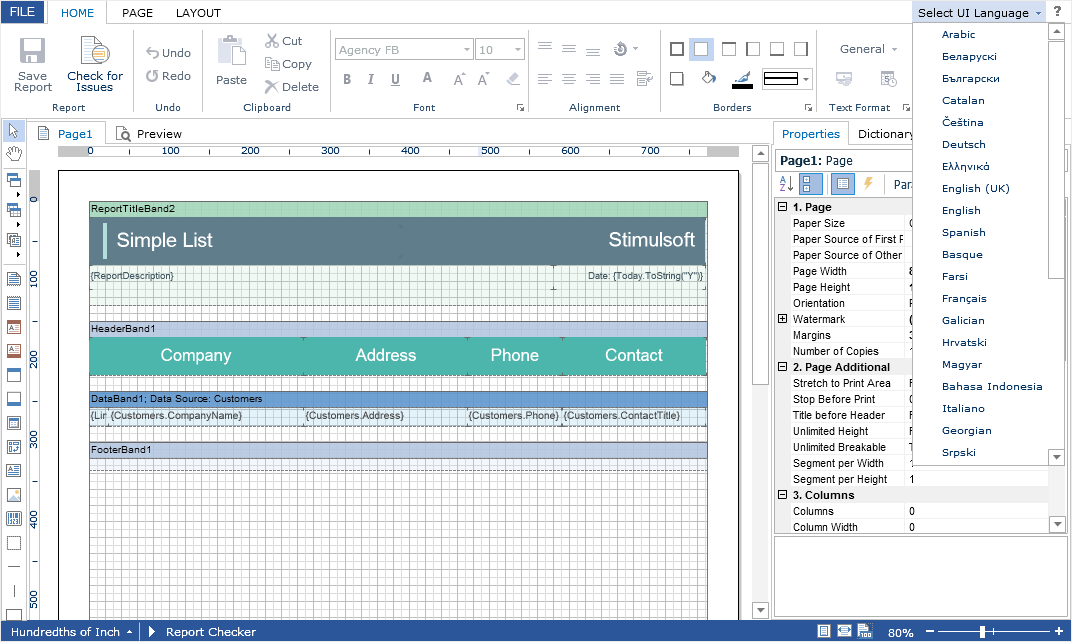
The interface of the report designer allows you to select the necessary localization from an accessible list. To do this, set value for the LocalizationDirectory property as the folder in which the localization XML files are stored.
Index.cshtml
...
@Html.Stimulsoft().StiMvcDesignerFx("MvcDesignerFx1",
    new StiMvcDesignerFxOptions() {
        Localization = "~/Content/Localization/en.xml",
        LocalizationDirectory = "~/Content/Localization"
})
...
Information
If the value for the Localization property is set, then when you run the report designer, the localization specified in this property will always be applied. If the property value is not set, the localization selected from the list of available localizations in the report designer panel will be automatically loaded.