

Report from File
Another way to add a list of items in the report server is to load a report from the file. The file may be located either in the item list or any other place. Below is the menu to load a report from the file:
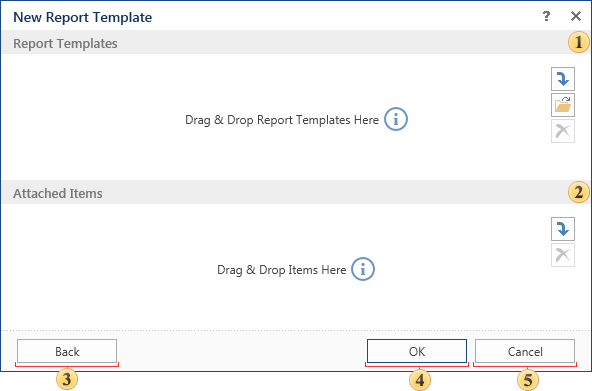
 This field specifies the report template file as a list of items of the report server, or from the local file system. You can also add multiple files. In this case each added file of a report template will be created as a separate item. The names of items will be generated automatically. Adding files to this panel can be done by dragging, and using the controls.
 In this field you can attach a data source to the report. Images, text files, including Rich-text, reports can also be attached to the template. If reports will be placed in this field, then they will be sub-reports in relation to the created reports.
- Information: If several files of report templates are specified (several items Report are be created), and additional items are specified too, then they (i.e. additional items) will be attached to all items Report.
 Pressing this button you will go back to the menu New report template.
 Clicking this button the new report template will be created.
 Cancels the report template creation.