

Styles
Group controls the styles and conditions, which are used for the automatic registration of the components in the report.
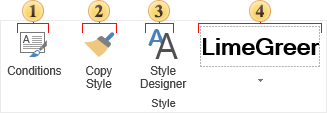
 Opens a window of the Conditions Editor for selected components.
 Opens a window of the Style Editor. How it works:
-
Select the component prototype from which you will copy the style;
-
Click the button Copy Style;
-
Hover the cursor over components to which you want to apply the style. Press the mouse button and the style will be copied.
-
In order to exit the copy mode you should click on the button Copy Style again or press Esc.
 Calls a form to edit styles.
 The quick menu to select the style. It is a list of styles for the selected component of a particular type.